Automating Apple Watch Sleep Tracking with Shortcuts and OpenClaw
I wanted a small piece of personal automation.
My Apple Watch already tracks sleep every night. I wanted the numbers to land in my own system every morning, so OpenClaw could keep history, spot bad streaks, and ask me the missing human part: how do you feel?
I thought this would take an hour.
Of course it did not.
The final setup is boring:
- Apple Watch records sleep into Apple Health
- iPhone Shortcuts runs every morning at 07:00
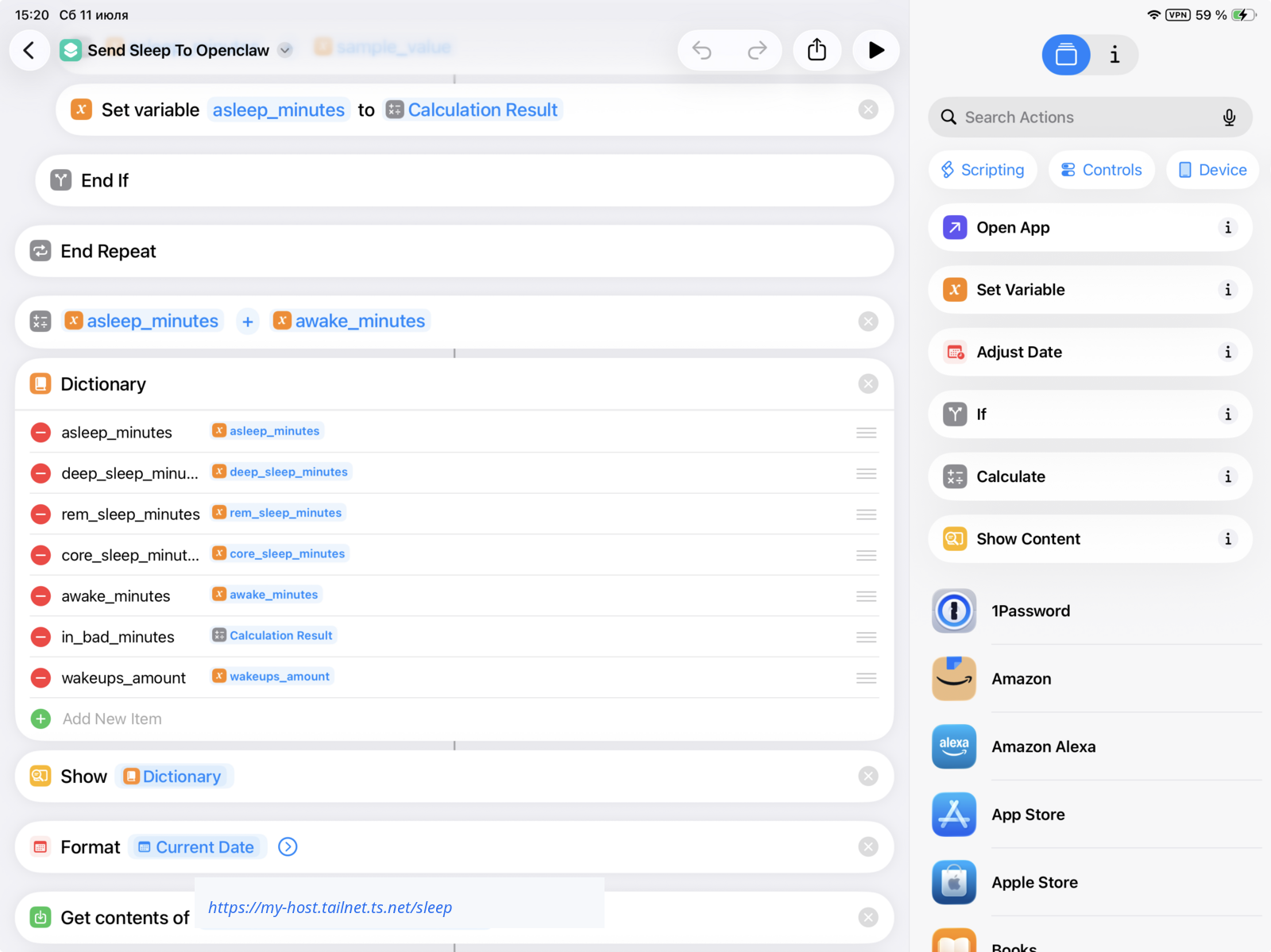
- Shortcut extracts sleep stages and a few other fields
- Shortcut posts JSON to a private OpenClaw webhook over Tailscale
- OpenClaw imports the record, computes a sleep score, and keeps history
The webhook was easy. The annoying part was convincing Shortcuts to return the correct sleep samples.
The architecture
I did not try to make OpenClaw “read” the Apple Watch.
Apple Health lives on the iPhone, and Apple quite reasonably keeps it there. So the direction is push, not pull. The phone extracts the data. OpenClaw stores and analyzes it.
The local side is a tiny receiver:
POST https://my-host.tailnet.ts.net/sleep
Authorization: Bearer <token>
Content-Type: application/json
The service is not public. It binds to 127.0.0.1 and is exposed to my tailnet via Tailscale Serve. The token sits in a local .env file with 600 permissions.
The Shortcut posts a payload like this:
{
  "date": "2026-07-11",
  "asleep_minutes": 444,
  "in_bed_minutes": 458,
  "awake_minutes": 14,
  "deep_minutes": 40,
  "rem_minutes": 70,
  "core_minutes": 334,
  "wakeups": 7,
  "bedtime_delta_minutes": -26,
  "energy": 4,
  "notes": "felt fine"
}
If Apple exposes a score, I can store it. If not, I calculate a rough one:
- duration: up to 50 points
- bedtime consistency: up to 30 points
- interruptions: up to 20 points
That roughly mirrors how Apple presents sleep quality without pretending to be Apple.
Here is how the analytics looks after the payload lands in OpenClaw:
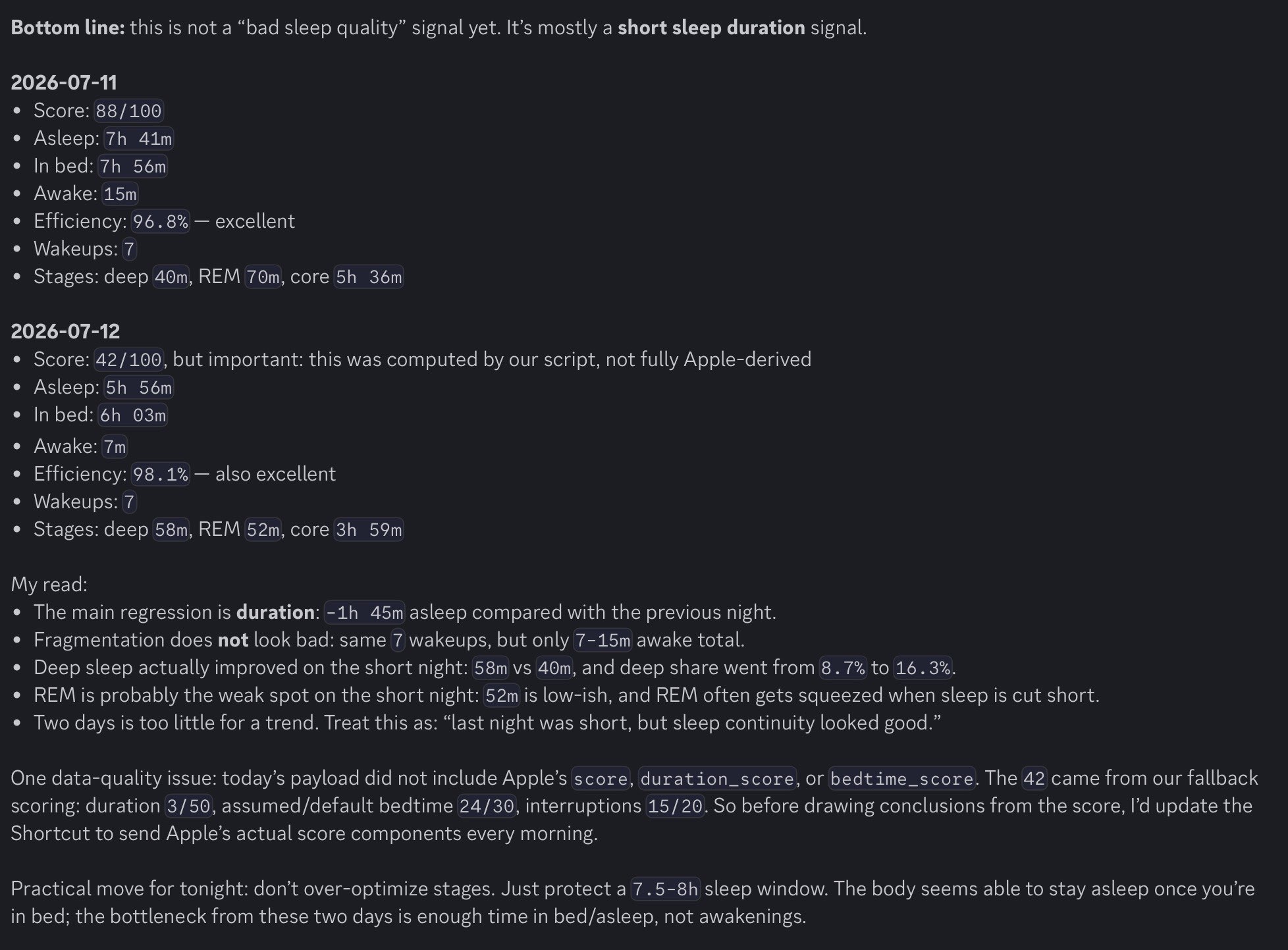
This is the useful part for me. The agent does not just repeat the score. It compares nights, separates the real signal from the noisy one, and says the boring but actionable thing: the bad number was mostly duration, not sleep continuity.
In this example the fallback score looked scary, but the detailed read was calmer:
- sleep efficiency was still excellent
- wakeups stayed stable
- awake time was low
- deep sleep share improved
- REM probably suffered because the night was short
That is the kind of interpretation I want from personal analytics. Not “your score is 42, panic”, but “protect a 7.5-8h sleep window tonight; the rest does not look broken.”
Calibrating the score
After the first couple of nights, I compared my fallback score against the score Apple Watch showed for the same night.
Apple documents the high-level scoring model:
- duration: up to 50 points
- bedtime consistency: up to 30 points
- interruptions: up to 20 points
It also documents the score bands: very low, low, OK, high, and very high. For bedtime consistency, Apple says it looks at when you fell asleep during the last 13 nights. That is the important bit: a one-night import cannot know your real bedtime baseline yet.
What Apple does not publish is the exact curve. There is no public “sleep score formula” I could just copy.
So the backend has two modes:
- If Apple sends the score and component scores, store those.
- If Apple does not send them, compute a local fallback and mark it as estimated.
The first fallback was too harsh. For one short but otherwise clean night, my script produced 42/100. Apple Watch showed 81/100:
- total score:
81/100 - duration:
34/50 - bedtime:
28/30 - interruptions:
19/20 - asleep:
5h49m - awake:
4m - wake-ups:
4
That told me the local score was wrong in a useful way. I was over-penalizing short duration and interruptions.
I adjusted the fallback to match the Apple-style anchors I have seen so far:
5h49masleep -> duration34/507h24masleep -> duration47/508h00masleep -> duration50/504wake-ups and4mawake -> interruptions19/207wake-ups and14mawake -> interruptions about14/20
For bedtime consistency, the right answer is to compute a rolling 13-night baseline from actual sleep onset times. Because sleep crosses midnight, that has to be a circular calculation: 23:50 and 00:10 are 20 minutes apart, not 23 hours and 40 minutes apart.
The rough version is:
baseline = circular median of the previous 13 sleep onset times
delta = shortest clock distance between last night's onset and baseline
bedtime_score = points lost as delta grows
Until I have about two weeks of records, the fallback bedtime score should be treated as low-confidence. This is exactly the kind of place where copying Apple’s final component score, when available, is better than pretending the local model is smarter than it is.
References:
- Apple Watch User Guide: View your sleep score
- Apple HealthKit sleep analysis category
- HealthKit sleep analysis values
- The 5K Runner’s reverse-engineering notes on Apple Watch Sleep Score
The Shortcut gotchas
The first version reached the webhook. Good.
The numbers were nonsense.
At one point the backend received:
{
  "asleep_minutes": 638,
  "awake_minutes": 16,
  "in_bed_minutes": 654
}
That is 10h38m asleep. Nice fantasy. Wrong planet.
Apple Watch showed 7h24m.
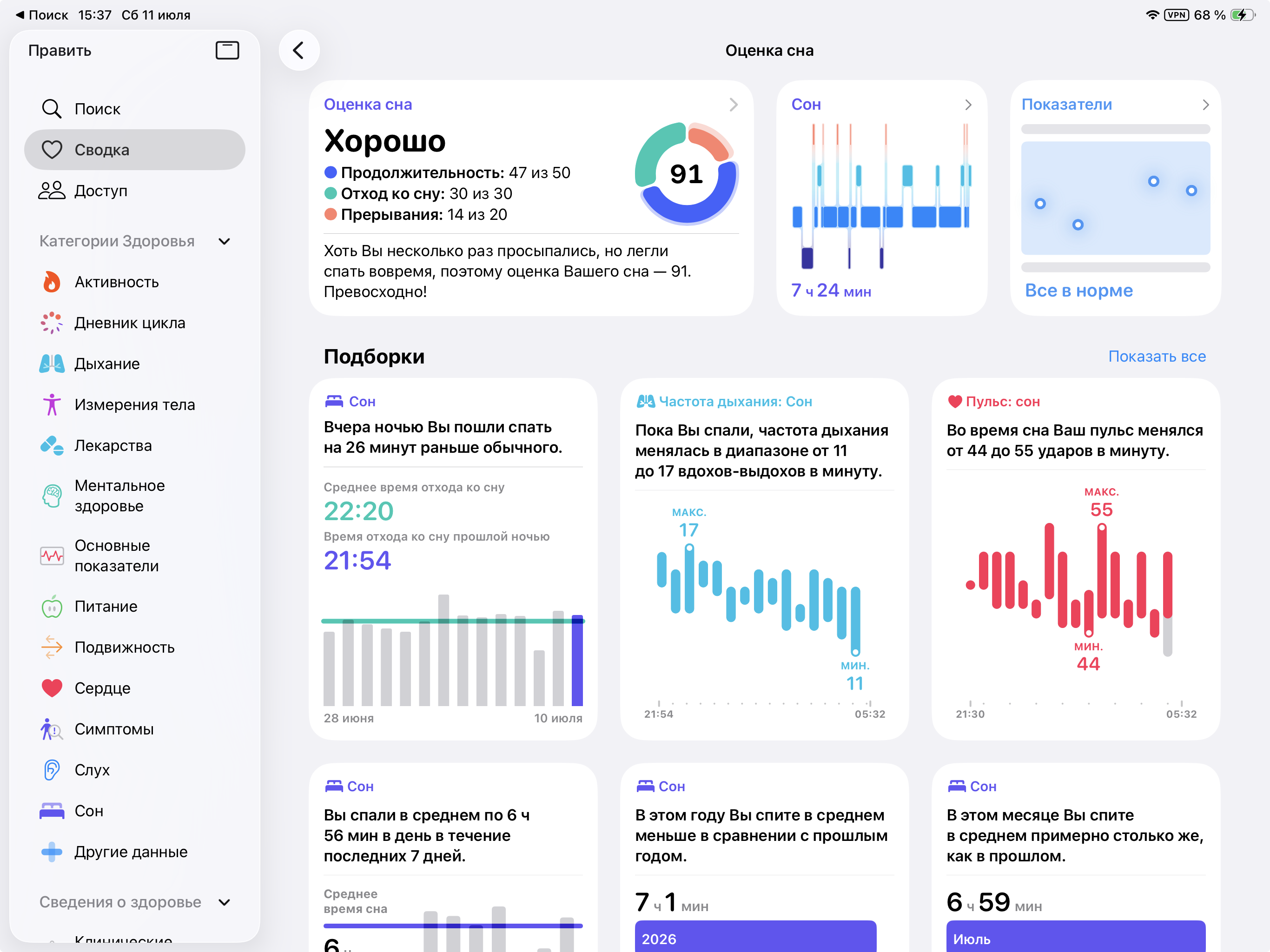
The problem was sample selection in Shortcuts.
Gotcha 1: build the Health Shortcut on the iPhone
Shortcuts exists on macOS, iPadOS, and iOS. That makes it tempting to build the automation on a bigger screen.
For Health data, that is a trap.
There is no Health app on macOS, and the iPhone is the device that actually has the Apple Watch sleep data I care about. iPad is better than Mac for editing Shortcuts, but it is still not the right source of truth for this workflow.
So the rule became:
Manage the sleep Shortcut on the iPhone.
Debug with the same device that has the Health data.
Otherwise you can waste time debugging a Shortcut that looks structurally correct but is running in the wrong environment.
Gotcha 2: save device state before muting
I also use a small helper Shortcut to mute the device before the automation starts making noise.
The important part is not the mute. That is easy. The important part is saving the current volume first, so the system can put the device back later instead of leaving it silently broken.
That helper does four things:
- gets the current media volume
- gets the device hostname
- sends the saved volume to my local system
- sets media volume to
0%
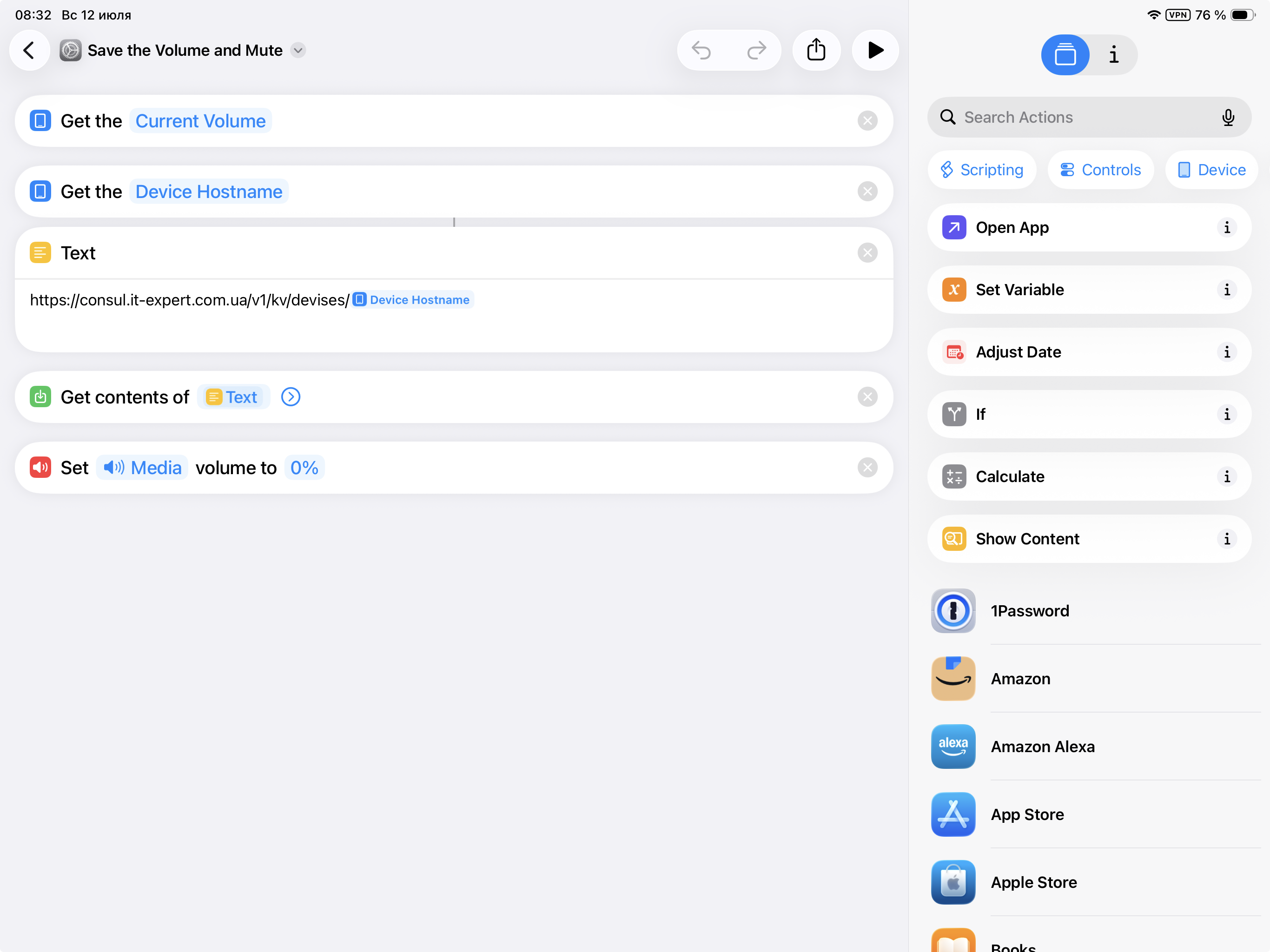
The URL includes the hostname because the same pattern should work across devices. “Mute this iPhone” is less useful than “save state for this specific device, mute it now, restore it later.”
Gotcha 3: sleep crosses midnight
Do not query “today”.
A normal night starts yesterday and ends today. If you filter sleep samples by date in the obvious way, you either miss part of the night or include some other sleep period.
The fix is to query broadly, then manually filter inside the loop.
For example:
sleep_window_start = submitted date - 1 day, 18:00
sleep_window_end   = submitted date, 12:00
Then process samples that overlap that window.
Gotcha 4: Find Health Samples filters by date, not really by time
This was the main trap.
The Shortcuts action looks like it accepts precise date-time filters. In practice, sleep samples behaved more like date buckets. Samples from another sleep period appeared even when the time window should have excluded them.
So I stopped trusting the action filter.
The Shortcut now asks for a broad set of samples and does the real filtering in the repeat loop:
If sleep_window_start is before sample_end
  If sleep_window_end is after sample_start
    process sample
That is simple overlap logic. If a sample does not touch the sleep window, ignore it.
Gotcha 5: comparison order matters in Shortcuts
This one is stupid, but real.
This condition was unreliable:
If Start Date of Repeat Item is after window_start
The reversed comparison worked:
If window_start is before Start Date of Repeat Item
Same logic. Different result.
My guess: the first operand controls type coercion. If the first operand is a Health Sample detail token, Shortcuts sometimes treats it strangely. If the first operand is your own Date variable, comparison behaves like a normal date comparison.
So the rule became:
Put your own Date variable first.
Compare against Health sample dates second.
Ugly, but it works.
Gotcha 6: Duration values may not be minutes
Do not blindly add the Duration field.
Shortcuts may give you something that serializes weirdly, or a value that looks like seconds. The safer path is:
Get sample_start
Get sample_end
Get Time Between Dates
Unit: Minutes
Round Number
Set sample_minutes
Use that number. Do not add the raw Duration field.
Backend defenses
The backend should not blindly trust the phone. Mine certainly should not have trusted the first few payloads.
I added a few defensive behaviors after seeing bad payloads:
- accept Shortcut-friendly nested dictionaries
- accept labels like
core sleep minutesandwakeups_amount - tolerate typos from visual-programming experiments
- compute
in_bed_minutesfrom asleep + awake when missing - merge partial updates by date
- avoid overwriting known good score components with fallback values
- keep the last received JSON payload locally for debugging
The last one saved time immediately. Instead of guessing what Shortcuts sent, I could inspect the exact body.
Why this is worth doing
Apple Health already has nice charts. I am not trying to replace them.
I want the data close to my agent because the useful questions are not only “how did I sleep last night?”
The interesting questions are:
- Did I sleep badly three nights in a row?
- Is resting heart rate elevated compared with my baseline?
- Does late dinner correlate with worse sleep?
- Do hard workouts affect deep sleep?
- Should I take it easy today?
Numbers are still incomplete. I also want one tiny subjective prompt:
Energy 1-5?
Anything unusual?
That is the bit Apple cannot infer. Sleep stages explain part of the story. Feeling tired, stressed, sick, or fine explains another part.
The final lesson
The AI part was not the hard bit.
The webhook was not the hard bit either.
The hard bit was getting a consumer automation tool to return the right HealthKit samples.
That is a pattern I keep seeing with personal agents. Intelligence is rarely the bottleneck. The boring plumbing is: permissions, local data formats, date boundaries, and tools that almost expose what you need.
Still, once the pipe exists, it becomes a new capability.
Tomorrow at 07:00, my phone will send sleep data to my own system. OpenClaw can compare it with baseline, notice trends, and ask the one question Apple cannot answer:
How do you actually feel?
That is the kind of automation I like: small, personal, boring, useful.