I Built skillsync Because I Got Tired of Copying Agent Skills Around
I use several coding agents now.
Claude Code. Codex. Pi. OpenClaw.
They are different tools, with different strengths, but they all have one thing in common: they become much more useful when they know my local workflows.
Not generic prompts. Real workflows.
Things like:
- how to publish my blog
- how to process receipts for taxes
- how to work with my accounting system
- how to operate a specific project
- how to call a local helper CLI
- what paths matter
- what mistakes I already made once and don’t want to repeat
In Claude Code and OpenClaw this usually becomes a SKILL.md. In Pi it can live under .pi/skills. In other tools it may be repo documentation, commands, or local scripts.
And this is where the annoying part starts.
Every agent wants the same knowledge in a slightly different place.
Copy-paste works until it doesn’t
At first I did the obvious thing: copy the skill where I needed it.
One copy in .claude/skills.
Another copy in ~/.openclaw/workspace/skills.
Maybe another one in .pi/skills.
Maybe the helper script copied into ~/.local/bin.
This works for about five minutes.
Then I fix something in one copy and forget to update the others. Or I improve a project skill on my MacBook and later discover that the Linux box still has the old version. Or I find a Claude command that should really become a reusable skill, but converting it manually is just boring enough that I postpone it.
This is not a big architectural problem.
It is worse: it is a small paper cut repeated every day.
So I built skillsync.
What skillsync is
skillsync is a tiny local helper for syncing AI agent skills and lightweight tools across machines.
It is intentionally boring.
No cloud service. No registry. No account. No “platform”.
It assumes you already have a synced folder. I use Syncthing, because I already sync ~/Personal between my machines.
My current layout looks like this:
~/Personal/AI/
  skills/
    public/
    personal/
    projects/
      writebook/
        SKILL.md
        skill.meta.json
  tools/
    skillsync/
      bin/skillsync
    writebook/
      bin/writebook
Then I set:
export SKILLSYNC_HOME="$HOME/Personal/AI"
That folder becomes the source of truth.
Everything else is just installation.
Architecture
The architecture is almost embarrassingly simple. That is the point.
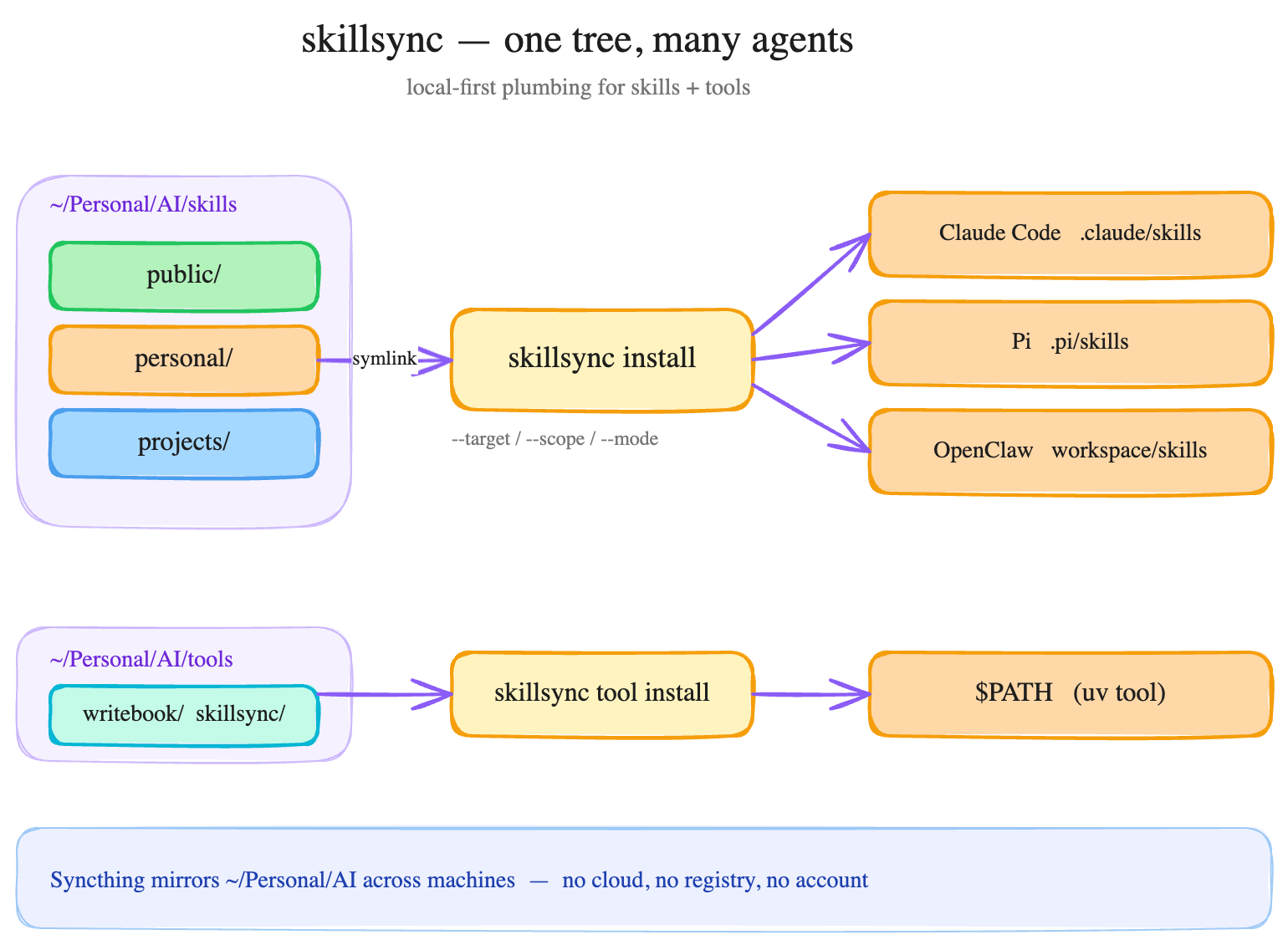
Syncthing mirrors the canonical ~/Personal/AI tree across my machines. skillsync does not care how the folder gets there. It only cares that there is one source of truth and that each agent gets a view in the format it expects.
The basic idea
A skill has one canonical home.
From there I can install it into the shape each agent expects.
Claude Code repo-local skill:
cd /path/to/project
skillsync install ~/Personal/AI/skills/projects/writebook \
  --target claude-code \
  --scope repo \
  --mode symlink
This creates:
.claude/skills/writebook -> ~/Personal/AI/skills/projects/writebook
Claude Code global skill:
skillsync install ~/Personal/AI/skills/projects/writebook \
  --target claude-code \
  --scope global \
  --mode symlink
Pi project skill:
cd /path/to/project
skillsync install ~/Personal/AI/skills/projects/writebook \
  --target pi \
  --scope repo \
  --mode symlink
OpenClaw workspace skill:
skillsync install ~/Personal/AI/skills/projects/writebook \
  --target openclaw \
  --mode symlink
For layouts that are not built in yet, there is --dest PATH. That is the escape hatch. I do not want the tool to pretend it knows every agent ecosystem.
Import instead of manually reorganizing
A lot of my useful skills already started inside projects.
For example, a Claude Code skill in:
.claude/skills/metabase
I can import it into the synced tree:
cd /path/to/repo
skillsync import .claude/skills/metabase \
  --bucket projects
Now it lives in:
~/Personal/AI/skills/projects/metabase
If I want the repository to use the managed version immediately:
skillsync import .claude/skills/metabase \
  --bucket projects \
  --link-back
Result:
.claude/skills/metabase -> ~/Personal/AI/skills/projects/metabase
This is the important bit: the project still sees the skill where it expects it, but I no longer have two independent copies.
Commands can become skills
Claude commands are often where workflows start.
A single markdown file. A useful instruction. A repeated action.
At some point it grows up and should become a skill.
So skillsync can convert a command file:
skillsync convert-command \
  .claude/commands/writebook.md \
  --to ~/Personal/AI/skills/projects/writebook \
  --name writebook
It creates:
SKILL.md
skill.meta.json
Again, not magic. Just removing the boring manual step.
Validation matters more than I expected
The other useful command is validation:
skillsync validate ~/Personal/AI/skills/projects/writebook
It checks for things that break reuse:
- missing
SKILL.md - missing
nameordescriptionfrontmatter - broken relative links
- likely secrets
- absolute local paths
- missing declared binaries or paths
This sounds mundane, but it is exactly the stuff that makes local agent workflows fragile.
A skill can work perfectly on one machine because /Users/maksymprokopov/... exists there. Then it fails on Linux. Or worse, I accidentally put private details into something that should be public.
I want the tool to catch that before I sync or publish anything.
Privacy buckets
Skills are operational memory.
Some of that memory is safe to share. Some of it absolutely is not.
So I use buckets:
public— safe to publish; no private paths, no secrets, no personal datapersonal— only for my own machinesprojects— reusable inside a specific project or team contextopenclaw-only— can depend directly on OpenClaw-specific tools
This is another reason I do not want a hosted registry as the default mental model.
Local-first is boring, but boring is good here.
New machine setup
The test for this tool is simple: can I set up a new machine without remembering all the little paths?
Now the flow is roughly:
brew install uv

# wait for Syncthing to sync ~/Personal/AI
export SKILLSYNC_HOME="$HOME/Personal/AI"
uv tool install ~/Personal/AI/tools/skillsync

skillsync tool install writebook --mode symlink
writebook --help

cd ~/Developer/adminka-core
skillsync install ~/Personal/AI/skills/projects/writebook \
  --target claude-code \
  --scope repo \
  --mode symlink
That is good enough.
I do not need a perfect abstraction.
I need not to waste brain cycles on “where did I put the current version of this skill?”
Why I care about this
I think people underestimate how much of useful AI work is not prompting.
The real leverage comes from context and repeatable procedures.
The model is important, of course. But the difference between a toy demo and something I use every day is usually this:
- does it know my tools?
- does it know my project?
- does it know the safe path?
- does it remember the gotchas?
- can I reuse that knowledge tomorrow, on another machine, in another agent?
That is what skills are for.
skillsync is just the boring plumbing around that idea.
And honestly, boring plumbing is often the part that makes the shiny thing actually usable.
Repository: https://github.com/mprokopov/skillsync