Moving Gemini to postpaid billing through Vertex AI
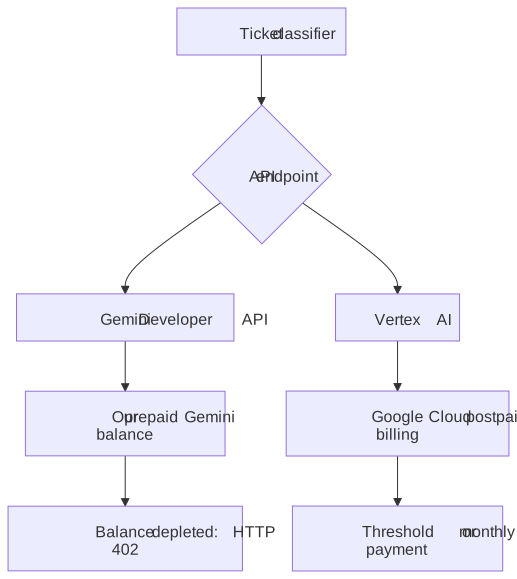
On 6 November, our support-ticket classifier stopped working. The application was still running, but every Gemini request was coming back with HTTP 402:
Your prepayment credits are depleted.
The first investigation found 35 failed classifications. Engineers had already handled most of those tickets manually. The failure was in a dependency we had not been watching closely enough: the prepaid balance behind our model API.
I wanted Gemini usage to go through ordinary Google Cloud postpaid billing. We kept the model and moved the requests to Vertex AI.
The first surprise was that creating an API key in the Google Cloud console did not mean we were using Vertex. Our application was calling generativelanguage.googleapis.com—the Gemini Developer API. Where I had created the key did not change which service the application called.
Google has been moving Developer API accounts to prepay. Its billing documentation says that an exhausted balance stops API keys across projects linked to that billing account. The migration applies to Gemini API usage; other Google Cloud services retain their postpay charging cycle. Gemini API billing
That distinction is why Vertex was useful here. We moved inference onto the Google Cloud service and its billing path. Postpaid does not necessarily mean a single invoice at the end of the month: self-serve Cloud Billing can charge automatically at a threshold or on a monthly cycle. Cloud Billing charging cycles
Our first implementation used service-account JSON credentials, token exchange and token caching. It worked in a live test, but I asked for a smaller change.
We ended up using an API key bound to a service account. Google calls this an authorization key. The service account still exists; the application supplies the key instead of handling OAuth token exchange itself. This is different from taking an existing Developer API key and changing the hostname. Google’s API-key documentation
For our integration, the migration was:
- Enable
aiplatform.googleapis.comin the Google Cloud project with billing enabled. - Give a dedicated service account the Vertex AI User role and create an authorization key bound to it, restricted to that API.
- Replace the application’s stored Gemini credential with the new key.
- Change the host and model path, and explicitly include
role: "user"in the request body.
The request URL changed from:
https://generativelanguage.googleapis.com/v1beta/models/MODEL:generateContent?key=KEY
to:
https://aiplatform.googleapis.com/v1/publishers/google/models/MODEL:generateContent?key=KEY
The second URL uses the project-less endpoint format Google documents for express mode. We tested it with our service-account-bound key; both this form and the explicit project/location form succeeded. REST endpoint reference
One small request-body difference mattered. Our old request omitted the role. On the Vertex path, that request failed with HTTP 400. Adding the role fixed our test:
{
  "contents": [
    {
      "role": "user",
      "parts": [{ "text": "Classify this support request." }]
    }
  ]
}
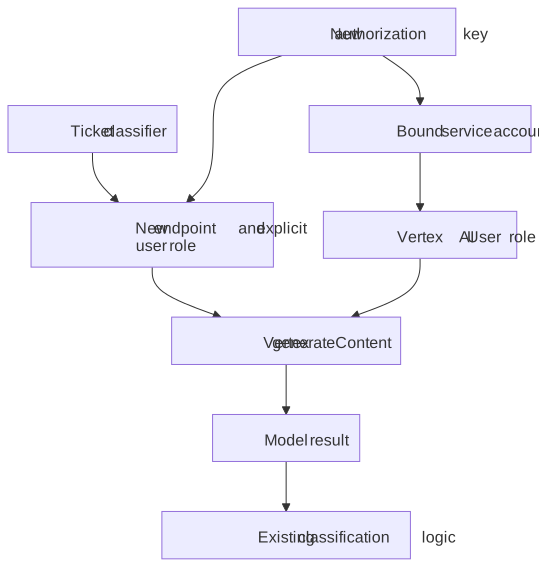
Our classifier could consume the response without changes. The client change was three lines, alongside a test and deployment documentation. That was the size of our integration change, not a promise that every Gemini application migrates in three lines.
We checked the new credential and endpoint with live requests before deploying. After deployment, we reran four outstanding tickets from the outage. All four received model results and were automatically classified. That was the useful verification: the actual workflow worked again.
There are two qualifications I would keep attached to this approach. First, authorization keys are long-lived credentials acting as their bound service account. Google documents restrictions and security caveats for them; the small code change does not remove that responsibility. Second, a successful inference request proves the request path works. Confirming the resulting charges belongs in Cloud Billing.
Vertex is also not the only possible way back to postpaid billing. Google now describes a postpay upgrade for eligible Developer API accounts with an established payment history and higher usage tiers. We chose Vertex for this application. Google’s prepay announcement
The operational lesson for me is simple: the model name is only part of the dependency. The endpoint, credential and billing arrangement determine whether the application can actually use it. We kept Gemini, changed those pieces, and got ticket classification working again.