The Pi Extensions I Use Every Day
Pi has a deliberately small core. Out of the box, it gives you read, write, edit, and bash inside a fast terminal harness—and stays out of your way. Everything else belongs in extensions.
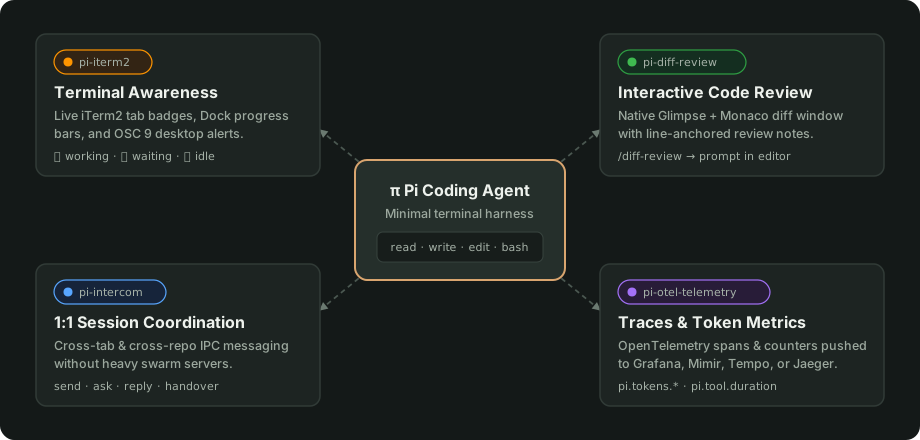
After months of running Pi across multiple repositories every day, my ~/.pi/agent/settings.json has settled on four packages. Each solves a specific friction point in terminal-based agent workflows: knowing when an agent needs attention, reviewing large diffs without losing context, coordinating work across terminal tabs, and tracking token spend.
Here is the setup I run every day.
{
  "packages": [
    "git:github.com/mprokopov/pi-iterm2",
    "git:https://github.com/badlogic/pi-diff-review",
    "npm:pi-intercom",
    "git:github.com/mprokopov/pi-otel-telemetry"
  ]
}
1. pi-iterm2: Stop Staring at Running Terminals
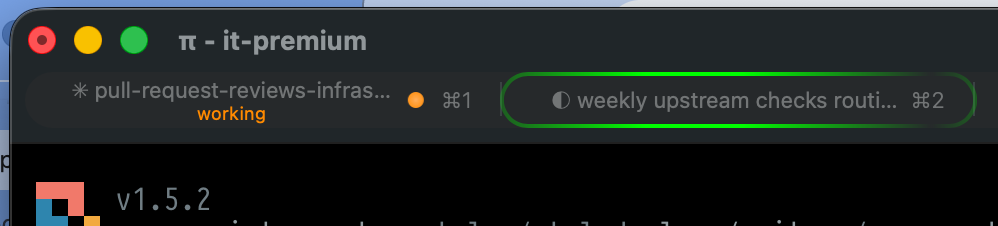
When you have four or five Pi sessions running in different iTerm2 tabs, the worst habit you can fall into is tab-cycling to check if an agent finished a long test run or got stuck waiting for confirmation.
I built pi-iterm2 (landing page) to bring native iTerm2 status integration to Pi, matching the status conventions I already used with Claude Code.
What it adds to your terminal
- Tab status badges: Every tab shows a live state indicator right in the iTerm2 status bar or tab title:
🟠 Working · bash: git status(updates live with the active tool and target file or command)🔵 Waiting for your input(when the agent asks a question or triggers a confirmation prompt)🟢 Idle(ready for the next prompt)
- Dock & tab progress bars: Shows an indeterminate progress bar while Pi is executing tools, flips to an attention badge if input is required, and clears automatically when the turn finishes.
- Native macOS notifications: Sends an OSC 9 desktop notification when a turn that took longer than 4 seconds completes—or immediately if a session needs input while you’re in another window.
Under the hood, it uses a dual-layer update strategy: direct terminal escape sequences (OSC 21337, wrapped automatically for tmux and screen passthrough) paired with asynchronous iTerm2 session database updates via the it2 CLI.
Install
pi install git:github.com/mprokopov/pi-iterm2
You can verify everything is wired up inside Pi with /iterm2 test.
2. pi-diff-review: Monaco Diff Review Without Leaving the Flow
Terminal diffs are fine for a ten-line patch. They fall apart when an agent refactors six files and you want to leave inline feedback on three specific hunks before committing.
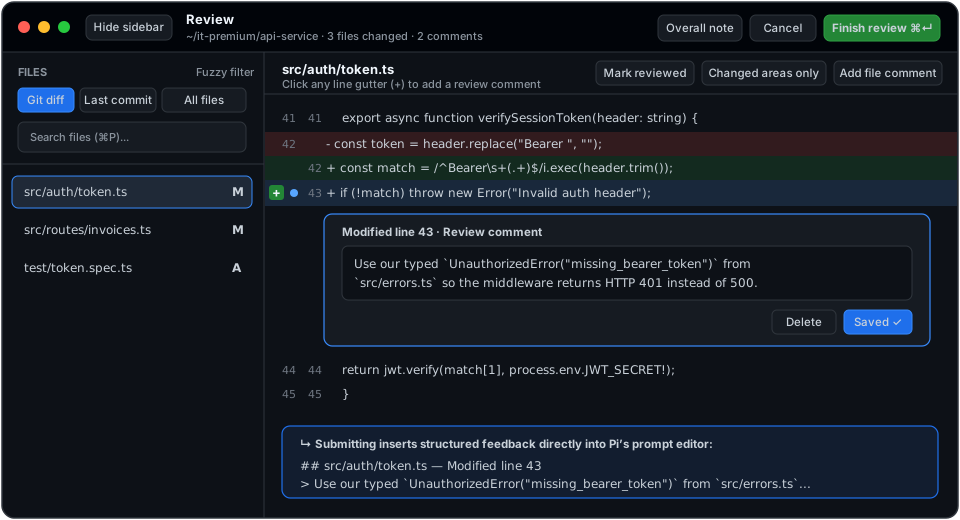
Mario Zechner’s pi-diff-review adds a /diff-review command that pops open a native, lightweight GUI window powered by Glimpse and the Monaco Editor.
How I use it
- Run
/diff-reviewafter an agent finishes a feature or refactor. - Switch between scopes right from the header (
git difffor uncommitted work,last commit, orall files) and jump between modified files using the fuzzy search sidebar (Cmd+P). - Click any line on the original or modified side (or leave a file-level comment) to write review notes—just like a GitHub PR review.
- Hit Submit (
Cmd+Enter).
Instead of copying and pasting line numbers back into the terminal, submitting the review closes the window and injects a structured Markdown prompt with all your line-anchored comments directly into Pi’s input editor. You hit Enter, and the agent addresses every review comment in one pass.
Install
pi install git:https://github.com/badlogic/pi-diff-review
3. pi-intercom: 1:1 Cross-Session Messaging
Real work rarely fits inside a single repository or a single context window. Maybe one Pi session is deep inside a backend API repo and another is updating the frontend client. Or maybe you want one session to research an issue and hand over a clean summary to a fresh implementation session.
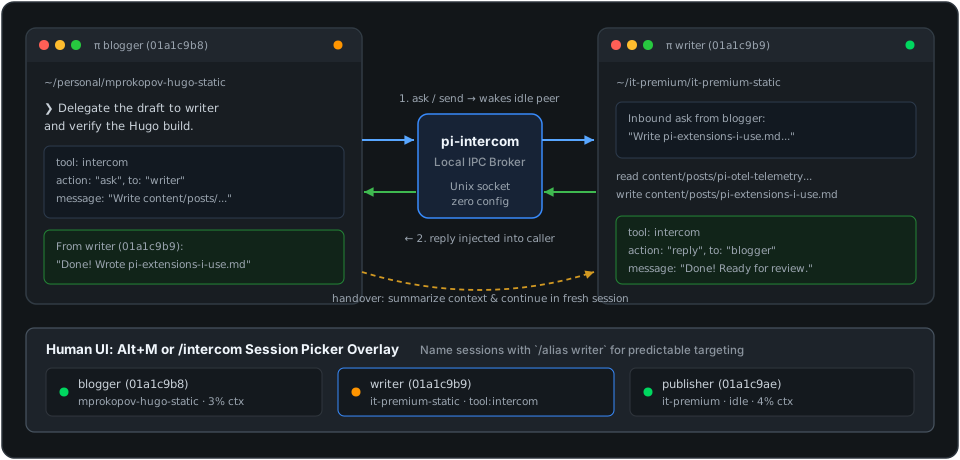
Most “multi-agent orchestration” tools try to solve this with heavy swarm servers or opaque background daemons. pi-intercom takes the Unix approach: direct 1:1 messaging between local Pi sessions over a lightweight local IPC broker.
Daily patterns
- Cross-repo consultation: My frontend session can run
intercom({ action: "ask", to: "backend-api", message: "What's the exact payload schema for POST /v2/invoices?" }), wait for the backend session to inspect its code and reply, and keep coding without me manually shuttling snippets between tabs. - Planner-worker delegation: Name sessions clearly with
/alias(or pressAlt+Mto open the live session picker overlay), then let a coordinator session dispatch parallel tasks to worker tabs. - Clean context handovers: When a research session’s context window gets crowded with logs and dead ends,
intercom({ action: "handover", to: "clean-worker" })summarizes the findings and hands the actionable task over to a fresh session.
Install
pi install npm:pi-intercom
4. pi-otel-telemetry: Knowing Where Your Tokens Go
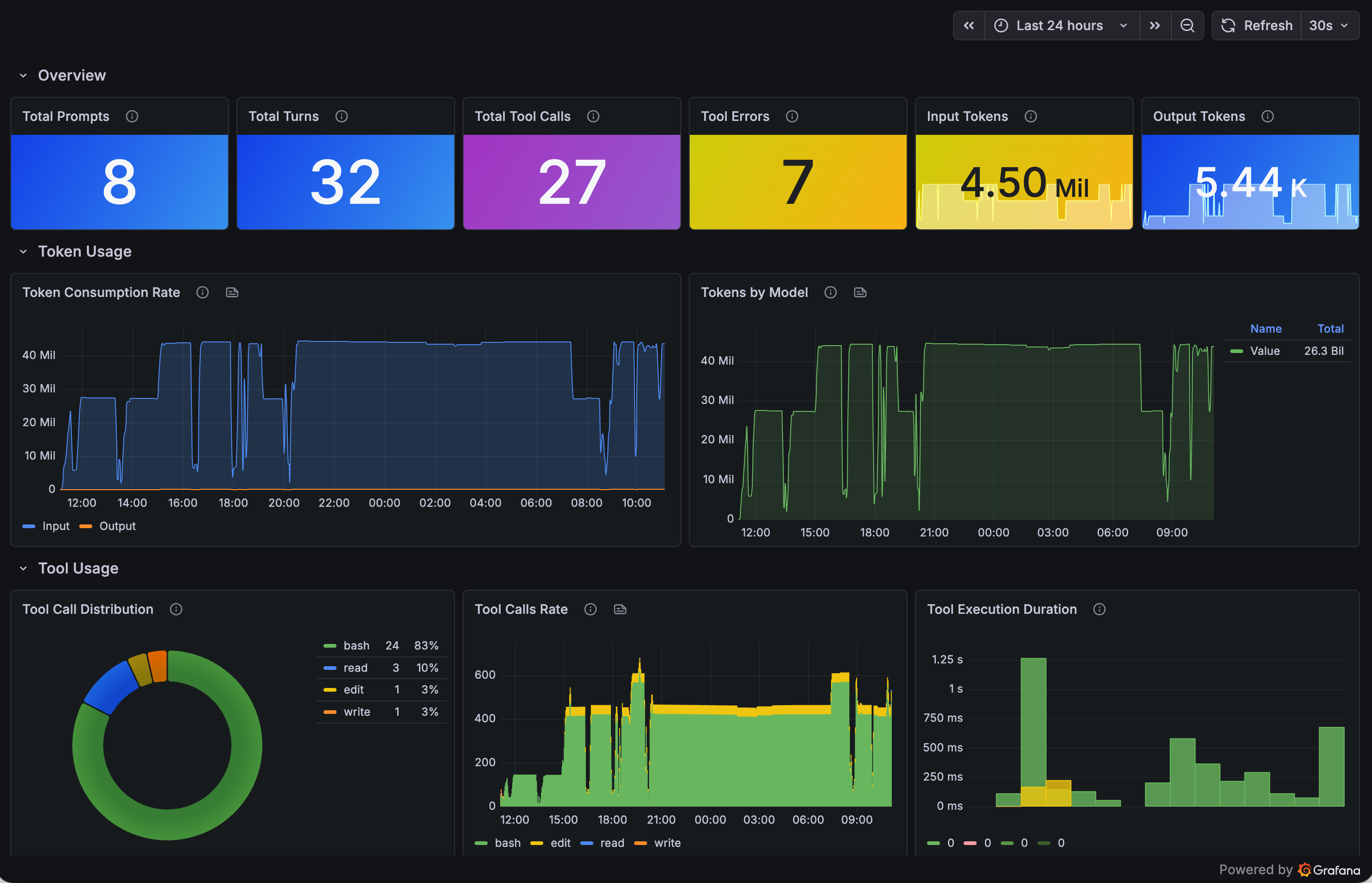
I wrote a dedicated post on pi-otel-telemetry earlier this year when I first wired Pi into my Grafana stack (Alloy, Mimir, and Tempo). Months later, it’s still running in every session I launch.
Without telemetry, you only notice a runaway tool loop or an expensive model configuration when your billing alert fires. pi-otel-telemetry hooks into Pi’s lifecycle and exports a clean trace tree for every session:
session (root span)
└── agent.prompt (per user message)
    └── agent.turn (per LLM call cycle)
        ├── tool.bash / tool.read / tool.edit / tool.write
        ├── llm.request (span event)
        └── model.changed (span event)
Alongside traces, it exports counters and histograms for input/output tokens (pi.tokens.input, pi.tokens.output), tool call counts, failure rates, and execution latency—broken down by model and tool name. It also resolves your identity from git config and OS username into standard OpenTelemetry resource attributes (user.email, user.name, host.name), so multi-machine or team dashboards work out of the box without high-cardinality metric label churn.
Install
pi install git:github.com/mprokopov/pi-otel-telemetry
Point OTEL_EXPORTER_OTLP_ENDPOINT at your collector (or a local Jaeger container), and every interactive or automated Pi session shows up in your dashboards.
Putting It Together
None of these four extensions turn Pi into a bloated IDE. They keep the core loop in the terminal while fixing the rough edges around it:
pi-iterm2tells me when a session needs me.pi-diff-reviewlets me critique what it changed.pi-intercomlets sessions talk to each other when work spans multiple repos or contexts.pi-otel-telemetryshows me how much it all costs and where latency hides.
If you’re using Pi, you can install any of them with a single pi install command—or drop all four into the packages array in ~/.pi/agent/settings.json.